Chrome's built-in bookmark manager hasn't meaningfully changed in a decade. You star a page, it lands in a folder you'll never open again, and six months later you're searching your own history hoping to recognise a page title. Anyone who reads seriously online hits that ceiling fast.
Developers have responded with a crowded market. Some tools chase the visual angle with boards and thumbnails, others bolt bookmarking onto a note app you already pay for, and a few go further by letting you highlight and annotate the page itself rather than just filing the URL.
I wanted to find out which ones actually hold up. In this article, I'll compare 12 of the most popular bookmark manager extensions available on the Chrome Web Store today, ranked by score. A few are also available for Edge and Firefox, but we'll focus primarily on their Chrome build.
This guide is about extensions — third-party tools that sit
on top of Chrome. If you only need Chrome's own folder tree, open
chrome://bookmarks
or follow our walkthrough of
Chrome's built-in bookmark manager
instead. Come back here when folders and title search stop being enough.
On Edge and missing Collections since the Edge 149 update? I wrote up where Edge Collections went and how to recover them separately.
One disclosure before the list: Web Highlights is mine, and it ranks first here. The scores come from Tooltivity, a review site my company runs too. It rates each extension from its Chrome Web Store listing, its ratings and what recent reviews report, so weigh our #1 with that in mind — and I'll say plainly what each of the other eleven does better.
List of the Best Bookmark Manager Extensions for Chrome:
- PDF & Web Highlighter + AI Summary & Notes
- Raindrop.io
- OneNote Web Clipper
- Notebook Web Clipper
- Humble New Tab Page
- Milanote Web Clipper
- Bookmark Sidebar
- Session Buddy - Tab & Bookmark Manager
- Toby: Tab Management Tool
- Instapaper
- New tab page by start.me
- Diigo Web Collector - Capture and Annotate
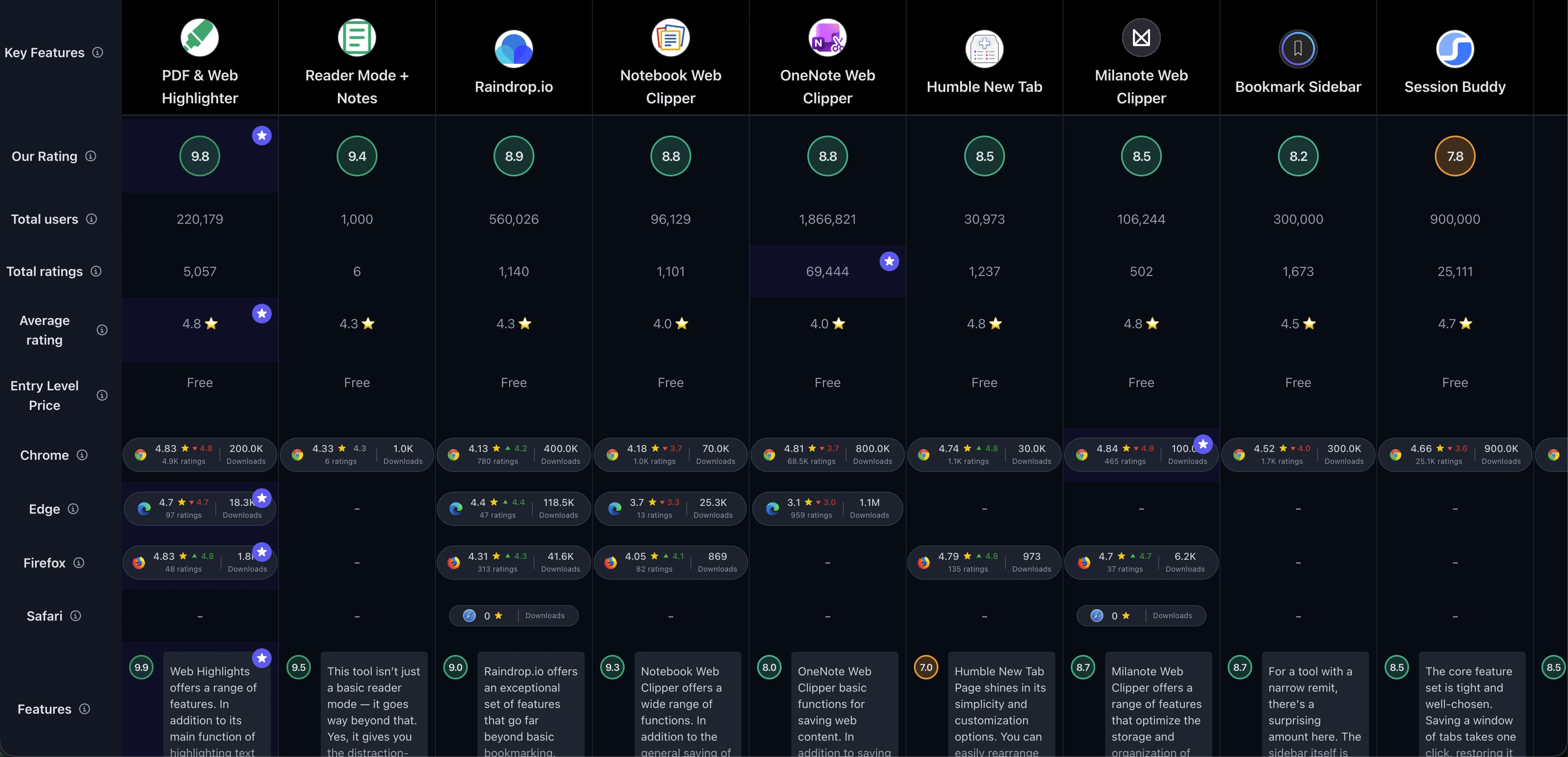
If you just prefer a simple comparison overview, check out the comparison table of all Chrome Bookmark Manager extensions :
1. PDF & Web Highlighter + AI Summary & Notes
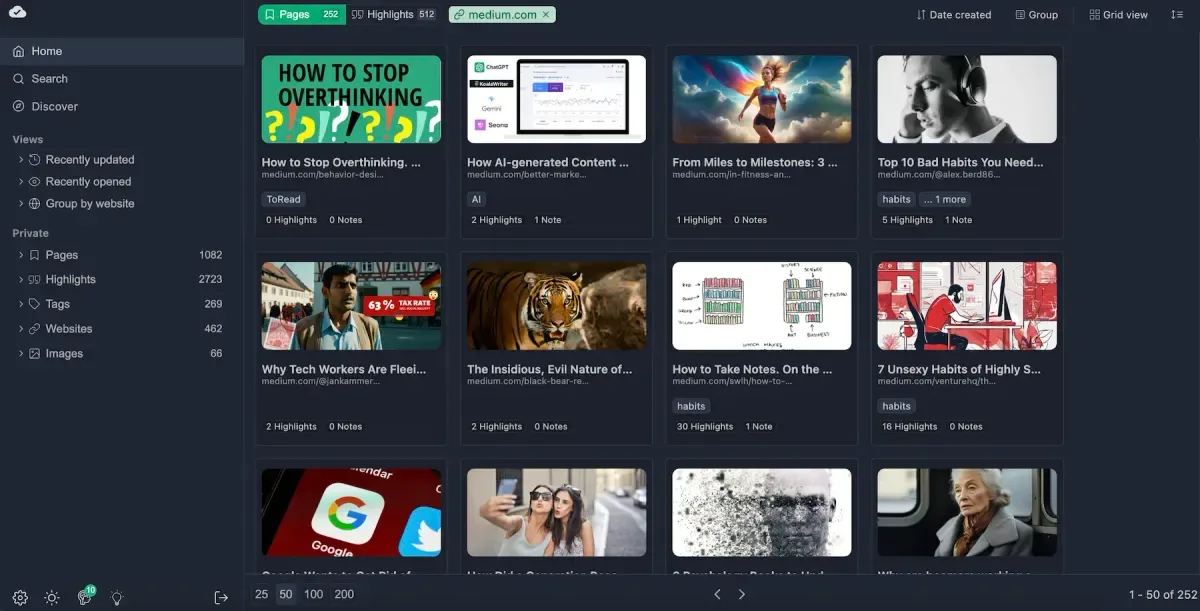
Web Highlights sits at the top of this list, and the store numbers back that up. It has 300,000 users and a 4.8/5 rating on the Chrome Web Store from 5,100+ reviews, as evidenced by its 4.78 rating for the last 100 reviews — a score that's barely moved while several competitors here have slid. It's also on Edge and Firefox, so your library follows you if you switch browsers.
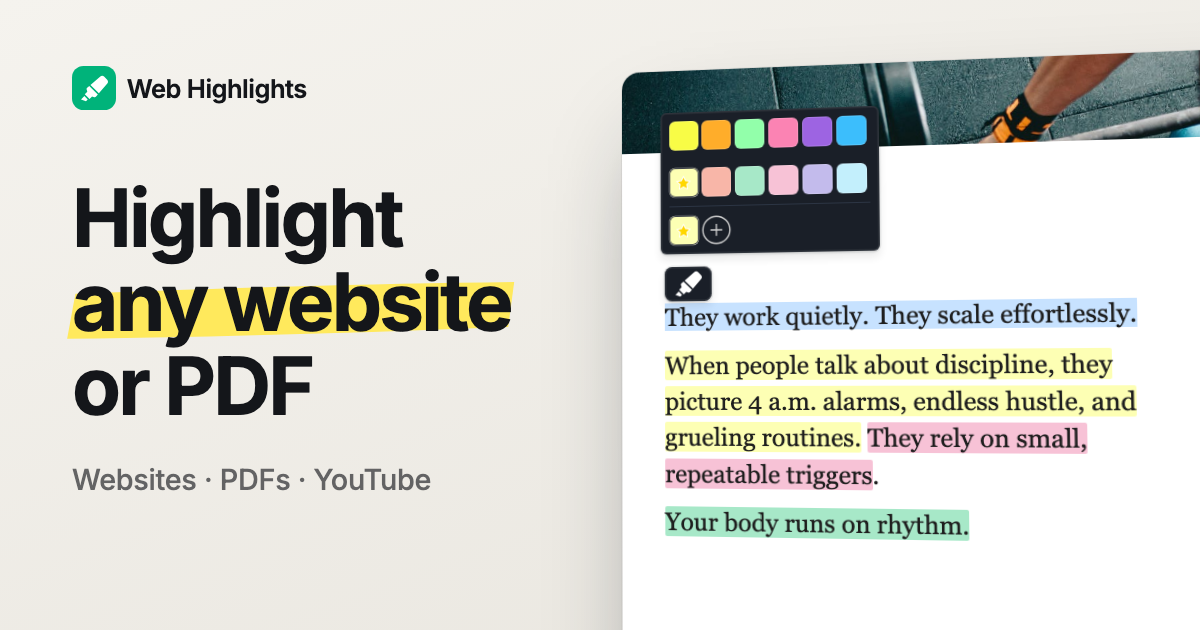
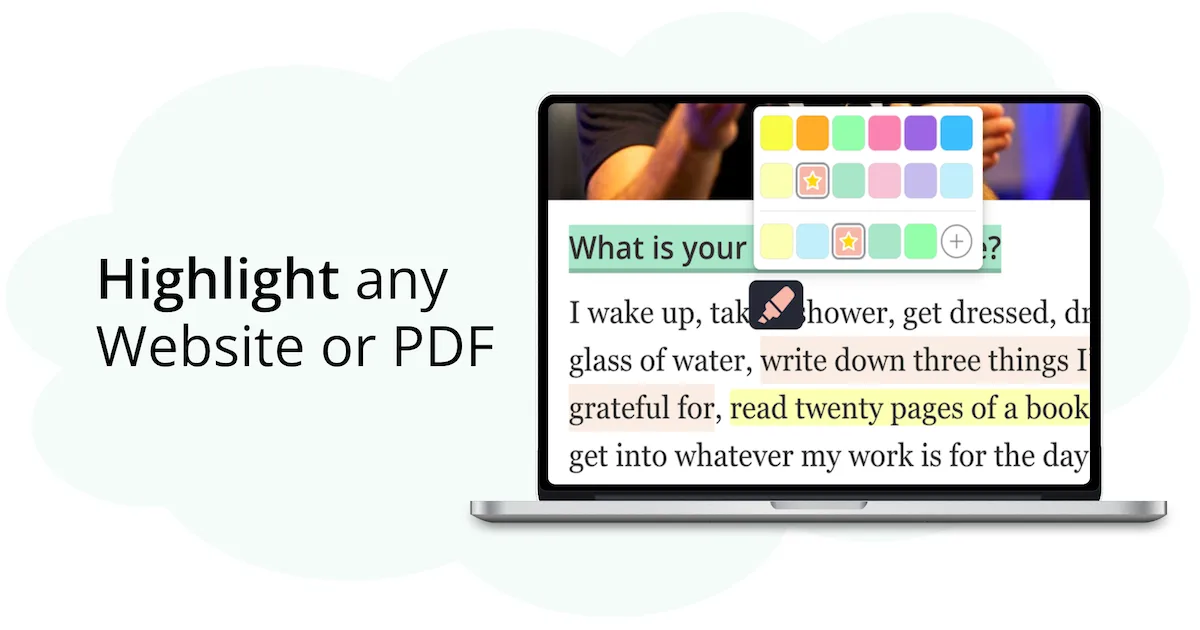
Here's what makes it different from everything else in this roundup: it doesn't just save the URL, it saves what mattered on the page. You highlight the paragraph, add a note, and the bookmark arrives already carrying the reason you saved it. That extends to PDFs — online, local, and uploaded files up to 30 MB — and you can download them again with your highlights embedded as real annotations that Acrobat and Preview recognise. No other tool in this comparison does that, which is also why it shows up in our roundup of the best Adobe PDF alternatives .
The second thing worth knowing: the AI runs in your browser. The local LLM reads the full page context , so you can summarise a long article or ask questions about a website, PDF, or YouTube video without shipping the content to a server. And highlights don't just sit there — you can turn any one of them into a flashcard, group decks by topic, and review them with the SuperMemo spaced repetition algorithm . A bookmark manager that helps you remember what you bookmarked is a genuinely unusual pitch, and after a few weeks of use it's the feature we'd miss most.
Moving in is the part people worry about, and it's the part that takes the least time. Web Highlights reads the standard bookmarks-HTML file every browser exports, and your folder structure arrives as tags — there's a two-minute import walkthrough if you want to follow along, plus a longer guide on exporting your Chrome bookmarks and importing them . Once they're in, you get a nested collection tree with drag & drop alongside the tags.
If you'd rather see the basic save flow before installing, this short video walks through it:
Key Features
- Website Highlighting – Easily highlight text on any website
- PDF Highlighting – Mark up online, local, and uploaded PDFs (up to 30 MB), then download them with your highlights embedded as real annotations
- AI Summary – Create quick, AI-powered summaries of your highlights and websites
- AI Chat – The local browser LLM understands the full context of the page, so you can ask questions about any website, PDF, or YouTube video
- Multiple Colors – Use various colors to organize your highlights
- Note-Taking – Add notes to your highlights, or write standalone page notes with full formatting
- Bookmarking – Save pages as bookmarks for quick access
- Tagging – Organize your highlights and notes with tags
- Collections (Folders) – Organize bookmarks in a nested folder tree with drag & drop, alongside tags
- Cross-Device Sync – Sync highlights across devices via cloud
- Export Options – Export to Notion and Capacities (Ultimate), plus Markdown copy for Obsidian, HTML, or PDF
- Reminders – "Snooze" a bookmark and get reminded about it by email
- Flashcards & Spaced Repetition – Turn any highlight into a Q/A flashcard and review it with the SuperMemo algorithm, with AI generating whole decks on your device
Pros & Cons
Pros:
- Excellent free version
- No account required
- Spaced-repetition flashcard learning
- Collections, tags & notes
- Image highlighting supported
- Keyboard shortcuts
- Cross-device sync & beautiful web app
Cons:
- Cloud sync requires a paid plan
- No native mobile app yet — though you can still save bookmarks from your phone
Who is this great for?
Web Highlights is perfect for anyone who saves pages in order to use them later — students working through course material, researchers building a literature pile, writers collecting sources. If your bookmarks are raw material rather than a wish list, this is built for the way you work.
It's especially great for users who deal with PDFs. Journal articles, manuals, and contracts all live in the same library as your web clips, annotate the same way, and export with the annotations intact. The snooze reminders are a nice touch for the "I'll read this properly later" pile that everyone accumulates and nobody revisits.
Compared to others
Against Raindrop.io , Web Highlights trades some of Raindrop's polish in pure link curation for far deeper work on the page itself — highlighting, notes, and PDF annotation rather than a prettier grid of saved cards. OneNote Web Clipper captures more of a page into a notebook but gives you no way to mark up the live site, and it needs a Microsoft account. Compared to Diigo , which shares the highlight-and-annotate idea, Web Highlights offers a modern interface, more colors, on-device AI, and reliable link creation where Diigo's is patchy.
Detailed comparisons
PDF & Web Highlighter vs Raindrop.io • PDF & Web Highlighter vs Diigo • PDF & Web Highlighter vs OneNote Web Clipper
Rating Summary
Web Highlights has 300,000 users on Chrome with a 4.8/5 average from 5,100+ reviews, holding 4.78 across the most recent 100. Tooltivity gave PDF & Web Highlighter a score of 9.78/10 . Check out the full review here .

2. Raindrop.io

Raindrop.io is the tool most people mean when they say "proper bookmark manager." It has 500,000 users on the Chrome Web Store and a 4.1/5 rating from 783 reviews, and the trend is quietly positive — the last 100 reviews average 4.20, up from 3.78 across the last 500.
What we kept coming back to is the search. Raindrop indexes the full text of saved pages and PDFs, not just titles and URLs, so a half-remembered phrase actually finds the article. The permanent library is the other standout: it keeps a copy of the page, which matters more than you'd think once you've watched a few sources go dead. Collections nest, tags are smart, and shared collections make it usable for a small team without any extra tooling.
Key Features
- Full-Text Search – Search through the entire content of saved web pages and PDFs
- Cross-Platform Sync – Access your bookmarks from any browser or device
- Highlighting & Annotations – Mark important parts of web pages and add notes
- Collections & Tags – Organize content with customizable collections and smart tags
- Permanent Library – Keep copies of web pages even if they're taken down
- Team Collaboration – Share collections with team members or make them public
Pros & Cons
Pros:
- Comprehensive feature set
- Intuitive and user-friendly interface
- Powerful search capabilities
- Strong privacy focus
Cons:
- Limited customization options
Who is this great for?
Raindrop.io is perfect for anyone whose bookmark list has outgrown folders. If you're saving dozens of links a week across several projects and need to find one of them in a hurry two months later, the full-text index does the heavy lifting.
It's especially great for users who want their library to outlive the sources. Permanent copies plus cross-device sync make it a solid archive rather than a list of links that slowly rots, and the public collections are handy if you curate resources for other people.
Compared to others
Raindrop.io beats Toby on long-term storage and search, where Toby is really about the tabs you have open right now. Against PDF & Web Highlighter , Raindrop wins on link curation at scale but offers much lighter annotation and no PDF markup — I wrote a full Raindrop vs Web Highlights comparison if you're choosing between exactly these two. Compared to Milanote Web Clipper , Raindrop is the better pure archive, while Milanote is stronger if you want your saves arranged visually on a board.
Detailed comparisons
Raindrop.io vs PDF & Web Highlighter • Raindrop.io vs Toby • Raindrop.io vs Milanote Web Clipper
Rating Summary
Raindrop.io has reached 500,000 users on Chrome with a 4.1/5 rating from 783 reviews, and recent feedback is improving at 4.20 for the last 100. Tooltivity gave Raindrop.io a score of 8.92/10 . Check out the full review here .
3. OneNote Web Clipper

OneNote Web Clipper is the heavyweight here by sheer reach: 900,000 users and about 68,500 reviews on the Chrome Web Store, with a 4.8/5 all-time rating. That headline number needs a caveat, though. The last 100 reviews average 3.68, down from 4.19 over the last 500, which lines up with the sync complaints we ran into ourselves.
Used as intended, it's still hard to beat for free. Clip a full page, a region, or a stripped-down article view straight into any notebook and section, annotate it inside OneNote, and read it offline later. If your notes already live in Microsoft 365, this is the shortest path from browser to notebook — and it costs nothing beyond the account you already have. It's one of several tools worth weighing in our roundup of the best web clipper Chrome extensions .
Key Features
- Clip any webpage to OneNote – Save entire pages or just parts of them
- Highlight and annotate – Add notes and highlights to your clips
- Organize clips – Save clips to specific notebooks and sections
- Offline access – Access your clips even when you're not connected to the internet
Pros & Cons
Pros:
- Easy to use
- Offline access
- Versatile clipping options
- Free of charge
Cons:
- Limited customization options
- Occasional syncing issues
Who is this great for?
OneNote Web Clipper is perfect for anyone already living inside the Microsoft ecosystem. If OneNote is where your meeting notes, project plans, and research already sit, clipping into the same notebooks removes a step you'd otherwise repeat every day.
It's especially great for users who need offline access to what they saved. Clips sync down to the desktop and mobile OneNote apps, so a flight or a bad connection doesn't cut you off from your reading pile.
Compared to others
Against Notebook Web Clipper , OneNote offers a far more mature notebook behind it, though Zoho's clean view is the nicer article capture. Compared to PDF & Web Highlighter , OneNote pulls content out of the page into a notebook, while Web Highlights leaves it in place and annotates it there — and only one of the two handles PDFs properly. Raindrop.io is the better choice if you want a searchable link archive rather than a growing pile of notebook pages.
Detailed comparisons
OneNote Web Clipper vs Notebook Web Clipper • OneNote Web Clipper vs PDF & Web Highlighter • OneNote Web Clipper vs Raindrop.io
Rating Summary
OneNote Web Clipper has 900,000 users on Chrome and a 4.8/5 rating from about 68,500 reviews, though recent sentiment has cooled to 3.68 over the last 100. Tooltivity gave OneNote Web Clipper a score of 8.83/10 . Check out the full review here .
4. Notebook Web Clipper

Zoho's clipper is the quieter option in this group, with 70,000 downloads and a 4.18/5 rating from 1,006 reviews on the Chrome Web Store. Recent reviews sit slightly lower at 3.73 for the last 100, against 3.90 across the last 500 — a mild dip rather than a collapse.
Its best trick is Clean View, which strips ads and clutter before saving so the clipped article actually reads well later. Everything lands as a card in Zoho Notebook, which suits people who think in scraps rather than documents. The built-in screenshot tool with annotation and the smart cards that turn bare links into something recognisable both save real time, and the free tier covers the essentials.
Key Features
- Web Clipping – Save text, images, and links as note cards
- Clean View – Clip articles without ads for a distraction-free reading experience
- Screenshot Tool – Capture and annotate screenshots directly
- Smart Cards – Convert links into smart cards for easy reference
- Meeting Notes – Take notes during online meetings with integrated tools
Pros & Cons
Pros:
- Easy integration with Zoho Notebook
- Free version available with essential features
- Clean View for ad-free article clipping
Cons:
- Some features could be more intuitive
- Occasional performance lags
- Limited customization options
Who is this great for?
Notebook Web Clipper is perfect for anyone already using Zoho Notebook, or anyone looking for a free card-based place to dump research without committing to a subscription.
It's especially great for users who save a lot of articles to read later. Clean View strips a page down to a tidy, readable capture, and the screenshot annotation covers the pages that resist clean extraction.
Compared to others
OneNote Web Clipper has the stronger notebook and a much larger user base, but Zoho's clean article capture is the better of the two. Against Milanote Web Clipper , Notebook is more generous on free storage while Milanote is far more flexible visually. Compared to Instapaper , Notebook does more than reading — screenshots, meeting notes, and cards all live in the same place.
Detailed comparisons
Notebook Web Clipper vs OneNote Web Clipper • Notebook Web Clipper vs Milanote Web Clipper • Notebook Web Clipper vs Instapaper
Rating Summary
Notebook Web Clipper has 70,000 downloads on Chrome with a 4.18/5 rating from 1,006 reviews, easing to 3.73 across the last 100. Tooltivity gave Notebook Web Clipper a score of 8.77/10 . Check out the full review here .
5. Humble New Tab Page

Humble New Tab Page is the smallest tool here and the best-liked. It has 30,000 downloads and a 4.74/5 rating from 1,102 reviews on the Chrome Web Store, and it's one of the very few extensions in this comparison where recent reviews run above the all-time average — 4.84 for the last 100. People who install it tend to keep it.
The concept is old-school in the best way: your new tab becomes a plain, fast, drag-and-drop board of your bookmarks, apps, and recently closed tabs. No feed, no widgets, no account, no telemetry. It's open-source under the MIT licence, it loads instantly, and it's also available for Firefox. If your bookmarks bar has quietly become your real bookmark manager, this makes that habit workable.
Key Features
- Customizable Layout – Drag-and-drop functionality for easy organization
- Lightweight Performance – Minimal impact on system resources
- Open-Source – Available for tweaks and modifications
- Simple Design – Focuses on usability over aesthetics
- Cross-Browser Compatibility – Available for Chrome and Firefox
Pros & Cons
Pros:
- Open-source and free
- Lightweight and fast
- Highly customizable
- Simple, user-focused design
Cons:
- No advanced features like task management or widgets
- Limited visual appeal
- Customization may be too basic for some users
Who is this great for?
Humble New Tab Page is perfect for anyone who wants their existing Chrome bookmarks in front of them without adopting a whole new system. There's nothing to sign up for and nothing to migrate.
It's especially great for users who care about speed and privacy. It stays out of the way, uses almost no resources, and the open-source code means you can check exactly what it does — a fair trade for skipping cloud sync and annotations entirely.
Compared to others
Where Toby turns the new tab into a paid, account-bound workspace, Humble does the free, local version of roughly the same job. Against Raindrop.io , it offers no search, sync, or archiving — it just surfaces what you already have, instantly. Bookmark Sidebar shares the same free, local, no-account philosophy but reaches your bookmarks from the screen edge on any page rather than only on the new tab. Compared to PDF & Web Highlighter , it's a launcher rather than a research tool; the two happily coexist.
Detailed comparisons
Humble New Tab vs Toby • Humble New Tab vs Raindrop.io • Humble New Tab vs PDF & Web Highlighter
Rating Summary
Humble New Tab Page has 30,000 downloads on Chrome with a 4.74/5 rating from 1,102 reviews, and recent reviews are even stronger at 4.84. Tooltivity gave Humble New Tab Page a score of 8.50/10 . Check out the full review here .
6. Milanote Web Clipper

Milanote's clipper carries the highest raw store rating in this comparison: 4.84/5 from 465 reviews, with 100,000 downloads on the Chrome Web Store. Recent sentiment holds steady at 4.79 for the last 100 against 4.85 over the last 500 — small numbers, but consistently happy ones.
It's the pick for people who think spatially. Articles, images, and links land on a Milanote board where you arrange them by hand, next to your own notes and sketches. For mood boards, campaign planning, or anything where the relationship between saved items matters as much as the items, nothing else here comes close. It also spans Chrome, Edge, Firefox, Safari, and Opera, so the boards are reachable wherever you work.
Key Features
- Web Clipping – Easily save articles, images, and links to your Milanote boards
- Organization – Create and manage boards to keep your projects organized
- User-Friendly Interface – Intuitive design that fits directly into Milanote
- Cross-Platform Availability – Available on Chrome, Edge, Firefox, Safari, and Opera
Pros & Cons
Pros:
- Extremely customizable boards
- Seamless integration with Milanote
- Very clear visual presentation of information
Cons:
- Severely limited storage space in the free version
- Requires a Milanote account
- A lot of manual work if you store large amounts of information at once
Who is this great for?
Milanote Web Clipper is perfect for designers, marketers, and anyone whose research is visual. If you'd rather see your references laid out on a canvas than listed in rows, this is the natural fit.
It's especially great for users running project-based work. Each board becomes a self-contained brief holding the clipped sources, images, and notes for one piece of work, which is far more legible weeks later than a folder of links.
Compared to others
Against Raindrop.io , Milanote trades searchable bulk storage for visual arrangement — and its free storage cap is much tighter. Notebook Web Clipper is the better free option if you just need clean article capture. Compared to PDF & Web Highlighter , Milanote organises what you saved but can't annotate the source; the highlighter keeps your reasoning attached to the page itself.
Detailed comparisons
Milanote Web Clipper vs Raindrop.io • Milanote Web Clipper vs Notebook Web Clipper • Milanote Web Clipper vs PDF & Web Highlighter
Rating Summary
Milanote Web Clipper has 100,000 downloads on Chrome and the highest store rating in this list at 4.84/5 from 465 reviews, holding 4.79 over the last 100. Tooltivity gave Milanote Web Clipper a score of 8.48/10 . Check out the full review here .
7. Bookmark Sidebar

Bookmark Sidebar fixes the thing Chrome has left broken for a decade. It has 300,000 downloads and a 4.52/5 rating on the Chrome Web Store from 1,673 reviews, with the last 100 averaging 3.99 against 4.31 over the last 500 — a mild softening rather than a slide.
The pitch is one gesture. Push your cursor to the edge of the browser window and your entire bookmark tree slides out over the page, nested folders and all, where you can drag things around, rename them, and delete them on the spot. After a week of it, Chrome's own bookmark manager and its eight-items-at-a-time dropdown feel like a bug.
What sets it apart from most of this list is that it doesn't build a parallel library. It reads and writes your actual Chrome bookmarks, so there's no import, no account, and nothing stranded if you uninstall it. It also does the maintenance nobody does by hand — the built-in checker scans your collection for dead links — and it can dock into Chrome's native side panel when you want bookmarks pinned open beside a page. If your tree itself is the mess, our guide on how to organize bookmarks in Chrome pairs well with it.
Key Features
- Edge-Triggered Sidebar – Push your cursor to the side of the screen and your full bookmark tree slides out over the page
- Nested Folder Tree – Browse your existing Chrome hierarchy as a proper expandable list
- Drag-and-Drop Editing – Rearrange, rename, and delete bookmarks directly in the sidebar
- Deep Customization – Control position, trigger area, width, colors, icons, and behavior in fine detail
- Chrome Side Panel Support – Dock bookmarks in Chrome's native side panel to keep them open alongside a page
- Broken URL Checker – Scan your collection for dead or redirected links
- Optional New Tab Page – Swap in a bookmark-focused new tab page, or leave yours alone
- Local Operation – Works on Chrome's own bookmarks with no account and no external service
Pros & Cons
Pros:
- Exceptionally deep customization
- Clean, attractive sidebar design
- Complete free tier
- One-time pay-what-you-want premium
- Works on native Chrome bookmarks
Cons:
- Breaks after some Chrome updates
- Drag-to-reorder unreliable on Chrome
- Settings panel is overwhelming
- No sync beyond Chrome bookmarks
- Faint, small settings typography
Who is this great for?
Bookmark Sidebar is perfect for anyone who already likes their bookmarks and just wants to reach them properly. If you've got a folder tree you've curated for years, this makes it usable without asking you to move it anywhere.
It's especially great for users who resent subscriptions. The free version is the whole tool, and premium is a one-time payment where you name the price — closer to a tip than a paywall. One reviewer paid despite not needing the premium features, simply to support the work.
Compared to others
Against Raindrop.io , Bookmark Sidebar is the lighter, local answer — no account, no cloud, no migration, but equally no full-text search or permanent page copies. Humble New Tab Page shares the free, open, local philosophy but surfaces bookmarks on the new tab rather than on demand over any page. Compared to Toby , it manages saved bookmarks rather than live tab sessions, and its free tier isn't capped by item count.
Detailed comparisons
Bookmark Sidebar vs Raindrop.io • Bookmark Sidebar vs Humble New Tab • Bookmark Sidebar vs PDF & Web Highlighter
Rating Summary
Bookmark Sidebar has 300,000 downloads on Chrome with a 4.52/5 rating from 1,673 reviews, easing to 3.99 across the last 100. Tooltivity gave Bookmark Sidebar a score of 8.20/10 . Check out the full review here .
8. Session Buddy - Tab & Bookmark Manager

Session Buddy is the veteran of this group and the one with the widest gap between reputation and current mood. It has 900,000 downloads and a 4.66/5 all-time rating from 25,111 reviews on the Chrome Web Store — but the last 100 average 3.65, and the last 500 just 3.06. That's the steepest decline in this comparison, and it's worth understanding before you install.
The core loop is still excellent. One click captures every open window and tab as a named session you can close and restore later; a dashboard shows every tab across the browser on one page, and a single search box covers open tabs, saved sessions, and bookmarks together. Crash recovery happens on its own, so a forced Chrome update doesn't cost you an afternoon.
It's also the most private tool here. No account, no cloud, nothing leaving your machine unless you export it yourself — a real distinction from Toby , which now requires login, and start.me , which stores everything on its servers. The price of that stance is that your sessions live on exactly one computer, and the recent complaints — sessions vanishing after a crash or update — hit harder because there's no cloud copy to fall back on.
Key Features
- Session Save & Restore – Capture every open window and tab in one click, then bring the set back later
- Automatic Crash Recovery – Previous sessions are kept automatically, surviving crashes and forced updates
- Collections – Group saved tabs and bookmarks into named collections
- Unified Search – Search open tabs, saved sessions, and bookmarks from a single box
- Local-First Storage – Everything stays on your machine, with no account and no server round-trip
- Import & Export – Move data out as JSON, CSV, or plain text and back in elsewhere
- Manual Backups – Write a snapshot of your sessions to disk as a restore point
- Tab Dashboard – See every window and tab across the browser on one page
Pros & Cons
Pros:
- Completely free, no paid tier
- Reliable one-click session restore
- Local-first, no account needed
- Strong export and backup options
- Responsive developer support
Cons:
- No cross-device cloud sync
- Reports of vanishing saved sessions
- Instability after browser updates
- No drag-and-drop reordering
- Doesn't preserve Chrome tab groups
Who is this great for?
Session Buddy is perfect for anyone working on a single machine who wants to park and restore sets of tabs without handing their browsing history to a service. If you research in bursts across a dozen tabs and want them back tomorrow, this is the shortest path.
It's especially great for the privacy-minded. Nothing here requires an account, and everything can be exported to a file you control — rare in a category drifting steadily toward mandatory sign-in.
Compared to others
Against Toby , Session Buddy covers much of the same tab-session ground for free and without an account, though Toby's visual collections are better organised and genuinely shareable. Raindrop.io is the better long-term archive with real search and cross-device sync, where Session Buddy is about recovering your working state. Compared to Bookmark Sidebar , it handles live sessions rather than your curated bookmark tree — the two solve neighbouring problems and coexist happily.
Detailed comparisons
Session Buddy vs Toby • Session Buddy vs Raindrop.io • Session Buddy vs Bookmark Sidebar
Rating Summary
Session Buddy has 900,000 downloads on Chrome and a 4.66/5 all-time rating from 25,111 reviews, though recent sentiment has fallen sharply to 3.65 across the last 100. Tooltivity gave Session Buddy a score of 7.83/10 . Check out the full review here .
9. Toby: Tab Management Tool

Toby has 300,000 downloads on the Chrome Web Store and a 4.21/5 all-time rating from 3,284 reviews, but the recent picture is rougher: 3.50 for the last 100, against 3.43 over the last 500. The product didn't get worse so much as the terms did, and long-time users have said so loudly.
The core idea still works beautifully. Stash a whole window of tabs into a named, colour-coded collection, close them, and pull the session back later from your new tab page. Drag-and-drop organisation, shareable collections, notes for context, and integration with Chrome's native tab groups make it a genuinely good research workspace. The catch is the free tier, now capped at roughly 50 to 60 saved items, with a mandatory account and a paid subscription waiting past that line.
Key Features
- Visual Tab Collections – Group related tabs into named, color-coded collections visible on your new tab page
- One-Click Session Save – Stash an entire window of open tabs into a collection, then close them without losing your place
- Drag-and-Drop Organization – Rearrange tabs and collections with a tactile interface
- Shareable Groups – Send a collection to a teammate or across your own devices
- Google Tab Groups Integration – Ties Toby into Chrome's native tab groups
- Cross-Device Sync – Your collections follow you between machines once you're signed in
- Search & Tagging – Find any saved tab quickly instead of scrolling a wall of bookmarks
- Notes & Context – Add notes to collections so a saved project still makes sense weeks later
Pros & Cons
Pros:
- Powerful visual tab collections
- Saves and restores whole sessions
- Shareable groups for teams
- Clean, drag-and-drop interface
- Responsive, helpful customer support
Cons:
- Free tier now tightly capped
- Shifted to paid subscription
- Account login now mandatory
- Some users lost saved tabs
- Per-workspace billing is confusing
Who is this great for?
Toby is perfect for anyone who works in tab explosions — a dozen open at once per project, three projects running in parallel. Collapsing that into a saved collection and reopening it intact is a real workflow, not a gimmick.
It's especially great for small teams sharing research. Sending a colleague a whole collection beats pasting eight links into chat, provided you're willing to pay for the seats once you outgrow the free cap.
Compared to others
Raindrop.io is the better long-term archive with real search and a far more generous free tier, where Toby is about active sessions. Session Buddy is the closest direct rival and the obvious answer to Toby's item cap — free, unlimited, and local, though without the shareable collections or the polish. Against PDF & Web Highlighter , Toby manages tabs while Web Highlights manages what's inside them — and its free tier isn't capped by item count.
Detailed comparisons
Toby vs Raindrop.io • Toby vs Humble New Tab • Toby vs PDF & Web Highlighter
Rating Summary
Toby has 300,000 downloads on Chrome with a 4.21/5 rating from 3,284 reviews, though recent feedback has settled lower at 3.50 for the last 100. Tooltivity gave Toby a score of 7.77/10 . Check out the full review here .
10. Instapaper

Instapaper is the veteran of the read-it-later world, and its Chrome extension is the weakest link in an otherwise well-regarded product. It has 300,000 downloads but only a 3.76/5 rating from 561 reviews, and the recent trend is the poorest in this comparison: 2.82 across the last 100, down from 3.03 over the last 500.
The service itself is still excellent. Text View strips a page to clean typography, saved articles are available offline, and the Kindle integration remains the tidiest way to get web reading onto e-ink. The mobile apps for iOS and Android are polished. It's the browser extension where things wobble — saves that don't register and highlighting that fires inconsistently are the recurring complaints, and we ran into both.
If you landed here because your read-it-later app disappeared, that's a bigger story than one extension: Pocket shut down in 2025, and we covered what that meant for saved libraries at the time. For phone-first reading specifically, our list of the best-rated read-it-later apps for Android covers the alternatives.
Key Features
- Offline Reading – Save web pages to read later without an internet connection
- Text View – Clean, distraction-free reading experience
- Highlighting – Mark important passages in your saved articles
- Kindle Integration – Send articles directly to your Kindle device
- Browser Extension – Quick save functionality across major browsers
- Mobile Apps – Access your reading list on iOS and Android devices
- Folder Organization – Create custom folders to organize your saved content
Pros & Cons
Pros:
- Clean, distraction-free reading experience
- Reliable offline access to saved content
- Simple and intuitive interface
- Mobile apps for iOS and Android
Cons:
- Chrome extension has some reliability issues
- Some users report problems with the saving functionality
- Highlighting feature can be inconsistent
Who is this great for?
Instapaper is perfect for anyone whose reading happens away from the desk. If the point of saving an article is to read it on a phone, tablet, or Kindle later, the apps and the Kindle pipeline still justify the extension's rough edges.
It's especially great for users who want reading and nothing else. There are no boards, no workspaces, and no team features — just a queue, clean text, and folders, which is exactly why some people have stayed for over a decade.
Compared to others
Against Raindrop.io , Instapaper is a reading queue rather than a searchable archive, and Raindrop's extension is markedly more dependable. Notebook Web Clipper offers similar ad-free capture with more to do afterwards. Compared to PDF & Web Highlighter , Instapaper's highlighting is thinner and less reliable, and it can't touch PDFs.
Detailed comparisons
Instapaper vs Raindrop.io • Instapaper vs Notebook Web Clipper • Instapaper vs PDF & Web Highlighter
Rating Summary
Instapaper has 300,000 downloads on Chrome but the lowest store rating here at 3.76/5 from 561 reviews, with the last 100 averaging just 2.82. Tooltivity gave Instapaper a score of 7.72/10 . Check out the full review here .
11. New tab page by start.me

start.me is the most visual take on bookmark management here. It has 100,000 downloads and a 4.29/5 rating on the Chrome Web Store from 1,429 reviews, holding 4.2 across the last 100 against 4.56 over the last 500 — a gentler decline than most of this list.
Instead of a list, you get tiles: labelled, thumbnailed bookmarks arranged on a dashboard you design. Run several pages — work, study, personal — each with its own background image, then fill the space around your links with widgets. There are over 3,500 of them, covering weather, calendars, notes, to-dos, and news. The built-in RSS reader is the sleeper feature; one reviewer came back to start.me specifically because its feeds beat their dedicated reader.
The catch is that all of it lives on start.me's servers. That buys you sync across every browser and machine you use, which local-only tools here can't offer. It also means an outage or a regional block takes your bookmarks with it, and there's no offline copy — a pattern that shows up repeatedly in recent reviews rather than a hypothetical.
Key Features
- Visual Bookmark Dashboard – Replaces the new tab page with bookmarks as labelled, thumbnailed tiles
- Multiple Pages – Separate dashboards for work, study, and personal, each with its own background
- Widget Library – Over 3,500 widgets covering weather, calendars, stocks, search, and more
- Built-in RSS Reader – Follow news sources on your dashboard instead of running a separate reader
- Notes & To-Dos – Keep short lists and notes beside your links
- Cross-Device Sync – Your dashboard follows your account across browsers and machines
- Bookmark Import – Pull existing browser bookmarks into start.me in one step
- Address Bar Search – Type "me" plus a keyword in Chrome's address bar to search saved bookmarks
Pros & Cons
Pros:
- Genuinely beautiful visual bookmarks
- Multiple dashboards with custom backgrounds
- Large widget library
- Built-in RSS beats standalone readers
- Syncs across browsers and devices
Cons:
- Recurring page loading failures
- Requires a cloud account
- Blocked in some regions without VPN
- Can't display native browser bookmarks
- Free tier limited to three pages
Who is this great for?
start.me is perfect for visual thinkers. If a wall of text never sticks but a board of thumbnails does, this is the one that will finally make your bookmarks feel organised — several reviewers describe exactly that click.
It's especially great for people who want one screen to open the day on. Between the tiles, the widgets, the notes, and the RSS feeds, the new tab becomes a genuine command centre rather than a launcher, and it follows you to every machine you sign in on.
Compared to others
Against Humble New Tab Page , start.me is vastly richer and syncs everywhere, while Humble is instant, local, and never fails to load — a clean trade between capability and dependability. Milanote Web Clipper is the better canvas for project research, where start.me is the better daily home page. Compared to Bookmark Sidebar , start.me builds its own cloud library while Bookmark Sidebar just surfaces the bookmarks Chrome already holds.
Detailed comparisons
start.me vs Humble New Tab • start.me vs Bookmark Sidebar • start.me vs Milanote Web Clipper
Rating Summary
start.me has 100,000 downloads on Chrome with a 4.29/5 rating from 1,429 reviews, holding 4.2 across the last 100. Tooltivity gave New tab page by start.me a score of 7.70/10 . Check out the full review here .
12. Diigo Web Collector - Capture and Annotate

Diigo is a long-standing name in research bookmarking, with 100,000 downloads and a 4.60/5 all-time rating from 2,322 reviews on the Chrome Web Store. Recent feedback tells a different story: 3.50 for the last 100, down from 4.26 over the last 500, which matches how dated the tool now feels next to newer options.
The fundamentals hold up. Highlights reappear reliably when you revisit a page, notes attach to them, and everything syncs across devices — that's the job, and Diigo does it. But you're limited to four highlight colours, the sidebar outliner takes patience to learn, the link-to-highlight feature failed for us more than once, and the interface looks its age. It's still workable if you're already invested; it's a harder sell if you're not — our roundup of the best text annotation tools covers the alternatives in that specific niche, and the same applies if you're leaving Weava .
Key Features
- Highlighting – Works well, and highlights are recreated on refresh
- Notes – Add notes to your highlights
- Link Creation – Create links to your highlights, though this feature isn't very reliable
- Sidebar Outliner – Simple design, but takes time to understand
- Syncing – Highlights are synced across devices
Pros & Cons
Pros:
- Highlights are recreated on refresh
- Notes can be added to highlights
- Highlights are synced across devices
Cons:
- Outdated design
- Limited to 4 highlight colors
- Link creation feature is unreliable
- Sidebar is limited
Who is this great for?
Diigo is perfect for long-time users with years of annotated research already in the platform. The library holds up, and there's little reason to abandon it if it's serving you.
It's especially great for academic groups that adopted it early. The shared annotation model still works for classes and research teams — just don't expect the polish that newer tools bring.
Compared to others
PDF & Web Highlighter covers the same ground with a modern interface, more colors, on-device AI, and PDF annotation Diigo simply doesn't offer. Against Raindrop.io , Diigo annotates more deeply but loses badly on search and design. Compared to OneNote Web Clipper , Diigo keeps your notes on the live page instead of copying content into a notebook, which some researchers still prefer.
Detailed comparisons
Diigo vs PDF & Web Highlighter • Diigo vs Raindrop.io • Diigo vs OneNote Web Clipper
Rating Summary
Diigo has 100,000 downloads on Chrome with a 4.60/5 rating from 2,322 reviews, though recent reviews have dropped to 3.50 across the last 100. Tooltivity gave Diigo a score of 7.55/10 . Check out the full review here .
Do you even need a bookmark manager extension?
Honestly: maybe not. Type
chrome://bookmarks
into your address bar and you get a folder tree, drag & drop, search
by title, and sync across every Chrome you're signed into. For a reading list
plus a handful of folders, that's genuinely enough — and it costs nothing. We
keep a plain walkthrough of
Chrome's built-in bookmark manager
for exactly that reason.
- ✅ Free, built in, syncs with your Google account
- ✅ Folders and basic search, no setup at all
- ❌ No tags, no notes, and search only covers titles and URLs — not what the pages say
- ❌ Locked to Chrome; moving out means exporting an HTML file
Start there if you've never felt the pain. When the folder tree stops scaling — usually somewhere past a few hundred links — export your bookmarks and bring them to any tool on this list. Our Chrome export tutorial shows the two-minute version, and there are matching guides for Firefox and Edge if you're moving between browsers rather than out of one.
Final Thoughts
After working through all 12 Chrome bookmark manager extensions, one thing stood out: the tools that treat a bookmark as a container for your thinking beat the ones that treat it as a filed URL. PDF & Web Highlighter takes the top spot with a score of 9.78/10 for exactly that reason. It's the only tool here that highlights web pages and PDFs with real embedded annotations, runs its AI summaries and chat locally in your browser, and turns what you saved into spaced-repetition flashcards — all on a free tier that doesn't ask for an account. Its 4.78 rating across the last 100 Chrome reviews suggests we're not alone in that read.
A second pattern shows up across the reviews: the tools that keep your data on your own machine are quietly outlasting the ones that don't. Bookmark Sidebar and Humble New Tab Page never fail to load because there's nothing to load from. start.me is the most beautiful dashboard of the twelve and the one most likely to leave you staring at a spinner, and Session Buddy 's worst reviews are about sessions vanishing rather than features missing. Where your bookmarks physically live turns out to matter more than the feature list.
For specific needs: Raindrop.io is the best pure archive, with full-text search and permanent copies of pages that later disappear. OneNote Web Clipper is the obvious free pick if your notes already live in Microsoft 365, and Notebook Web Clipper is the cleanest free article capture outside it. Milanote Web Clipper wins for visual, project-based research, and Bookmark Sidebar is the best way to make the bookmarks you already have genuinely reachable. Session Buddy and Toby both handle tab sessions well — Session Buddy free and local, Toby polished but capped. Instapaper remains a great reading service held back by a shaky extension, and Diigo makes sense mainly if you're already there.
Every tool on this list has a usable free version, so the cheapest way to decide is to install two and save the same week of reading to both. If you want one recommendation to start with, make it PDF & Web Highlighter — no signup, nothing capped by item count, and you'll know within a few days whether annotating in place is how you want to work. Browse the full comparison of all Chrome bookmark manager extensions to weigh them side by side — or see the same exercise run on the 10 best Chrome language learning extensions , the 10 best email finder tools , the 10 best video downloader extensions the 10 best PDF extensions and the 10 best SEO extensions .